Tasks
Project tasks with assignees, due dates, dependencies, and views.
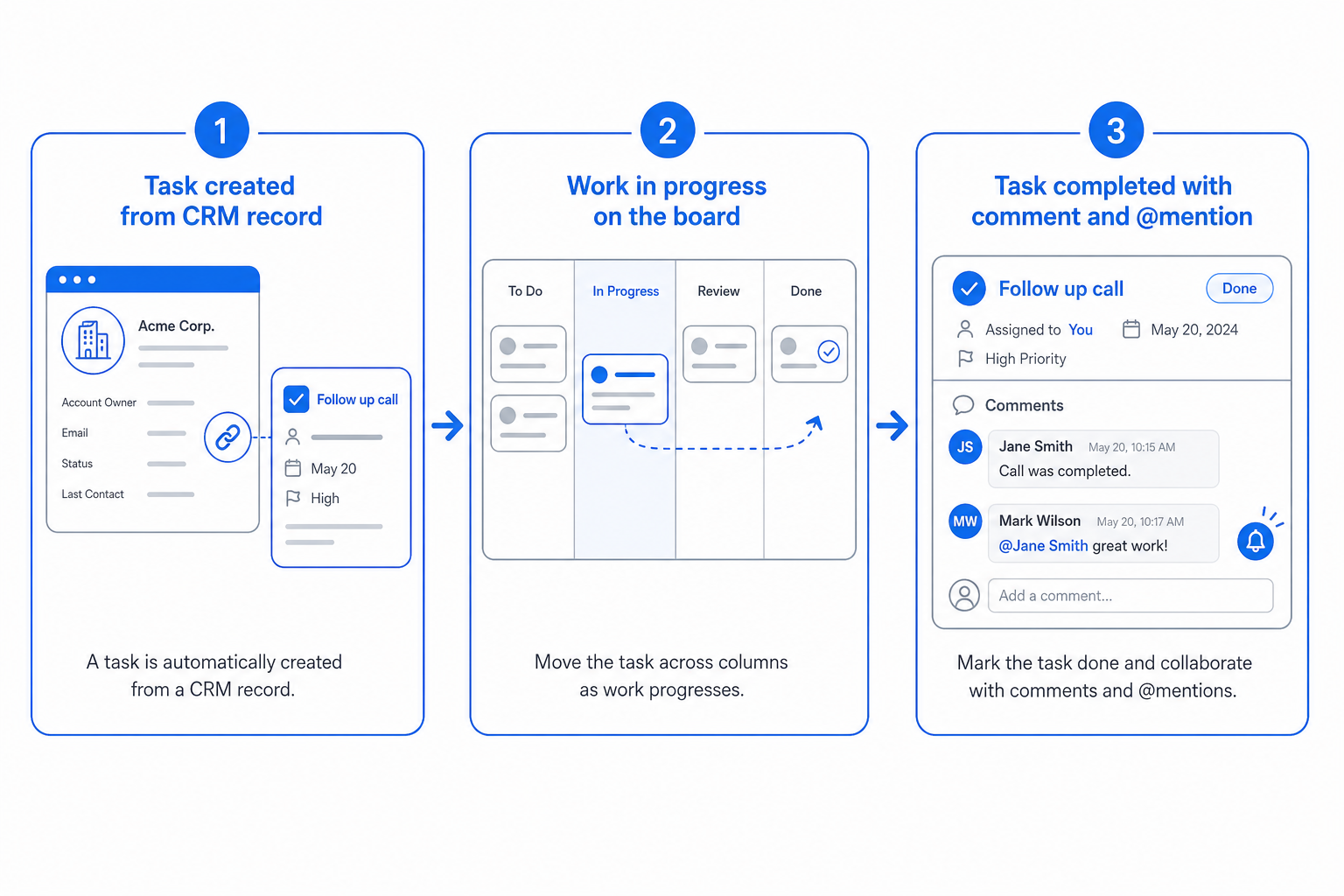
Tasks divorced from records end up forgotten. CloudIP tasks attach to the customer, deal, invoice, or project they are about, so they appear in the activity feed of every record they relate to.
List, board, and timeline views serve different planning styles.
Inside Tasks
Specifics that distinguish CloudIP Tasks from the alternative.
Attached tasks
Tasks live on records — customers, deals, invoices, tickets.
Multiple views
List, kanban board, and timeline for different planning styles.
Dependencies
Predecessor and successor relationships with critical-path highlighting.
Recurring tasks
Schedule recurring tasks with templates.
Tasks on the CloudIP platform
Where this capability lives, who runs it, and what it shares with the rest of the system.
Tasks runs as part of the CloudIP Productivity module on the same multi-tenant infrastructure as every other capability you use. There is no separate console to log into and no separate billing line: task management software is provisioned the moment your tenant is created and stays in lockstep with the rest of the platform as it grows.
Operators interact with task management software through the Productivity interface they already know — the same record screens, the same audit trail, the same role and permission model. Behind the scenes, attached tasks handles the heavy lifting, while recurring tasks keep the experience consistent across teams. Configuration changes are versioned, exportable, and reviewable, so the way you run task management software today is reproducible tomorrow.
Because Tasks reuses the platform's user database, every action is attributable, every record has a stable ID, and every export honours the tenant's data residency choice. That means task management software reports tie out to the rest of the books, audit logs, and operational dashboards without an integration step in between.
Tasks fits inside CloudIP Productivity alongside the other productivity capabilities — they share the same data model, so improvements in one tend to compound across the others. If you are evaluating CloudIP specifically for task management software, the rest of Productivity comes along at no extra cost.
Common questions about Tasks
Both. Tasks live in projects (or spaces, or personal lists), and a single task can be linked to a CRM contact, a help desk ticket, a customer record, or a deal — the link surfaces the task on the related record automatically.
More from Productivity
Personal todo lists that stay in sync across the app.
Agendas, notes, and action items linked to attendees and projects.
Per-team workspaces with files, notes, and shared dashboards.
Comments, mentions, and activity feeds across every record.
Single inbox of every shared file, task, and document.
Try Productivity free for 14 days
See Tasks alongside the rest of the platform on real data.